Jazz Balance Save Code 2026: How to Protect Your Balance from Auto-Deduction
Stop Auto-Deduction and Protect Your Balance
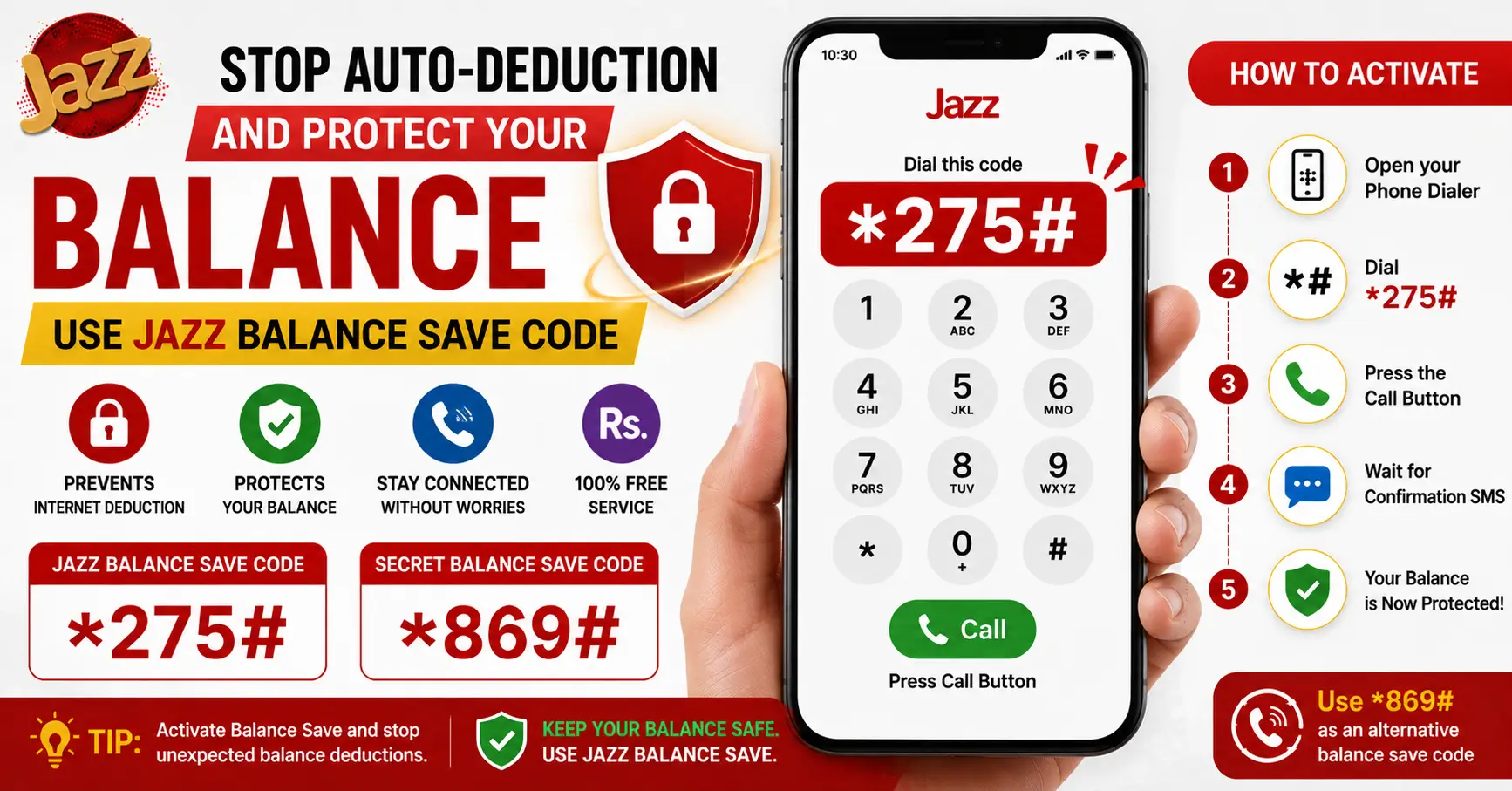
Jazz balance save code is the easiest way to protect your prepaid balance from unexpected internet charges and background data usage. Many Jazz users lose mobile balance because apps continue using mobile data when Wi-Fi is unavailable or because background services connect automatically. Activating the Jazz Balance Save feature helps prevent these unwanted deductions.
Jazz Balance Save Code
- Protects Balance from Internet Deduction
- Eligible for Jazz Prepaid Users
- Charges: Free
- Status: Balance Protection Enabled
Jazz Secret Balance Save Code
- Alternative Balance Protection
- Eligible for Jazz Prepaid Users
- Charges: Free
- Use if Supported on Your SIM
In this guide, you’ll learn how the Jazz balance save code works, how to activate or deactivate it, how to use the MyJazz App, and what to do if the code isn’t working. Whether you’re trying to save a few rupees or protect your entire balance, this article explains everything in a simple, step-by-step way.
What Does ‘Balance Save’ Mean on Jazz?
Balance Save is a free Jazz feature designed to protect your prepaid balance from accidental deductions caused by internet usage when you don’t have an active data package.
When Balance Save is enabled:
- Your balance is protected from pay-as-you-go internet charges.
- Mobile data sessions are restricted if no internet package is active.
- Background apps cannot consume your balance unexpectedly.
- You can still use mobile internet by subscribing to a valid Jazz internet package.
This feature is especially useful if:
- You mainly use Wi-Fi.
- You don’t keep a regular internet package.
- You want to avoid losing balance due to automatic app updates.
- You recharge small amounts of balance.
Important: Balance Save is available for Jazz prepaid users. Availability may vary depending on your SIM or region.
Jazz Balance Save Code (USSD Method)
The quickest way to activate Balance Save is through the official USSD code.
| Feature | Details |
|---|---|
| Service | Jazz Balance Save |
| Activation Code | *275# |
| Charges | Free |
| Eligibility | Jazz Prepaid |
| Purpose | Prevent accidental balance deductions |
How to activate
- Open your phone’s dialer.
- Dial *275#.
- Press the call button.
- Wait for the confirmation message from Jazz.
Once activated, your balance will remain protected from unintended internet usage without an active data bundle.
Tip: Always wait for the confirmation SMS before assuming the service has been activated.
How to Save Balance Using the MyJazz App
If you prefer using the MyJazz App instead of dialing USSD codes, you can manage Balance Save from the app whenever the option is available.
Steps
- Open the MyJazz App.
- Log in with your Jazz number.
- Go to Services or Manage Services.
- Find the Balance Save option.
- Tap Activate.
- Wait for the confirmation notification.
Using the app also lets you:
- Manage active services.
- Subscribe to internet packages.
- Check remaining MBs.
- View your balance.
- Access Jazz offers in one place.
How to Undo / Unsave Your Balance
If you want to use mobile internet without restrictions, you may need to disable the Balance Save feature.
The exact deactivation method may vary depending on your SIM profile or current Jazz system.
You can usually:
- Disable it through the MyJazz App, or
- Follow the deactivation instructions provided in the activation confirmation SMS.
If you cannot find the option:
- Contact Jazz Customer Care.
- Visit your nearest Jazz Franchise or Service Center.
- Check the latest instructions inside the MyJazz App.
Note: Once Balance Save is disabled, mobile data without an active package may again consume your prepaid balance.
Why Balance Gets Auto-Deducted in the First Place
Many users believe their balance disappears without any reason, but there are several common causes.
Background internet usage
Apps such as:
- TikTok
- Gmail
continue using data even when you’re not actively using them.
Automatic app updates
Google Play Store and system updates may download files over mobile data if Wi-Fi isn’t available.
No active internet package
Without a data bundle, Jazz charges according to the default pay-as-you-go internet tariff, which can reduce your balance quickly.
Cloud synchronization
Photos, videos, contacts, and backups may automatically sync in the background.
Mobile data left on
Even if your screen is locked, apps can continue consuming internet data.
Best practices to avoid balance deductions:
- Activate Balance Save.
- Turn off mobile data when not needed.
- Use Wi-Fi whenever possible.
- Subscribe to an appropriate Jazz internet package.
- Disable automatic app updates over mobile data.
Balance Save vs Balance Lock — Are They the Same?
Many users confuse these two terms, but they are slightly different.
| Feature | Balance Save | Balance Lock |
|---|---|---|
| Protects prepaid balance | ✔ | ✔ |
| Prevents internet balance deductions | ✔ | Usually Yes |
| Available via Jazz services | ✔ | May depend on service terminology |
| Purpose | Stop accidental balance usage | Protect available balance |
In everyday use, many people use Balance Save and Balance Lock interchangeably because both refer to protecting your prepaid balance from unnecessary deductions.
Always rely on the official Jazz service name shown in the MyJazz App or USSD menu.
Troubleshooting: Code Not Working
If the Jazz balance save code isn’t working, try the following solutions.
Check your SIM type
Balance Save is generally intended for Jazz prepaid customers.
Verify network coverage
Weak network signals can prevent USSD requests from completing successfully.
Restart your phone
A simple restart often resolves temporary network issues.
Try again later
Jazz systems occasionally undergo maintenance, which may temporarily affect USSD services.
Update the MyJazz App
If you’re using the app, install the latest version before trying again.
Contact Jazz support
If none of the above solutions work, contact Jazz Customer Care or visit the nearest Jazz service center for assistance.
Conclusion
Using the Jazz balance save code is one of the simplest ways to prevent unexpected balance deductions caused by mobile internet usage. If you don’t keep an active data package or mostly rely on Wi-Fi, enabling this feature can help protect your prepaid balance from unnecessary charges.
For the best experience, keep your MyJazz App updated, subscribe to an appropriate internet package when needed, and use the official Jazz Balance Save service to stay in control of your mobile balance.
FAQs
What is the correct Jazz balance save code in 2026?
Dial 275# to activate the Jazz Balance Save feature.
Does saving balance stop all deductions, including package renewal?
No, it only helps prevent internet balance deductions, not package renewals.
How do I unsave/return my saved Jazz balance?
You can disable it through the MyJazz App or by contacting Jazz Customer Care.
Is there a charge for using the balance save code?
No, the Jazz Balance Save service is generally free.
Why does my saved balance disappear automatically?
Your balance may still be used for calls, SMS, or active package renewals.
Can I save balance on a Jazz postpaid connection?
No, the Balance Save feature is mainly available for Jazz prepaid users.