Jazz Internet & APN Settings 2026 (Android & iPhone)
Jazz Internet & APN Settings
If your mobile data is slow, disconnected, or not working at all, updating your Jazz Internet & APN Settings can solve the problem in just a few minutes. In most cases, the issue is caused by incorrect APN settings, outdated network configuration, or temporary network glitches.
This guide explains the latest Jazz Internet & APN Settings 2026 for both Android and iPhone users, along with simple troubleshooting steps to restore your mobile internet connection..
What Is an APN and Why It Matters
APN stands for Access Point Name. It tells your phone how to connect to your mobile operator’s internet network.
If the APN is missing or incorrect, you may experience problems such as:
- Mobile data not working
- Very slow internet speed
- Apps not connecting to the internet
- MMS issues (if supported)
- Frequent connection drops
Using the correct Jazz Internet Setting helps your phone connect properly to the Jazz network.
Jazz Internet & APN Settings In Android (Manual Setup)
Follow these steps to manually configure the Jazz APN.
Step 1: Open Settings
Step 2: Tap Network & Internet or Connections
Step 3: Select Mobile Network
Step 4: Open Access Point Names (APN)
Step 5: Tap Add New APN
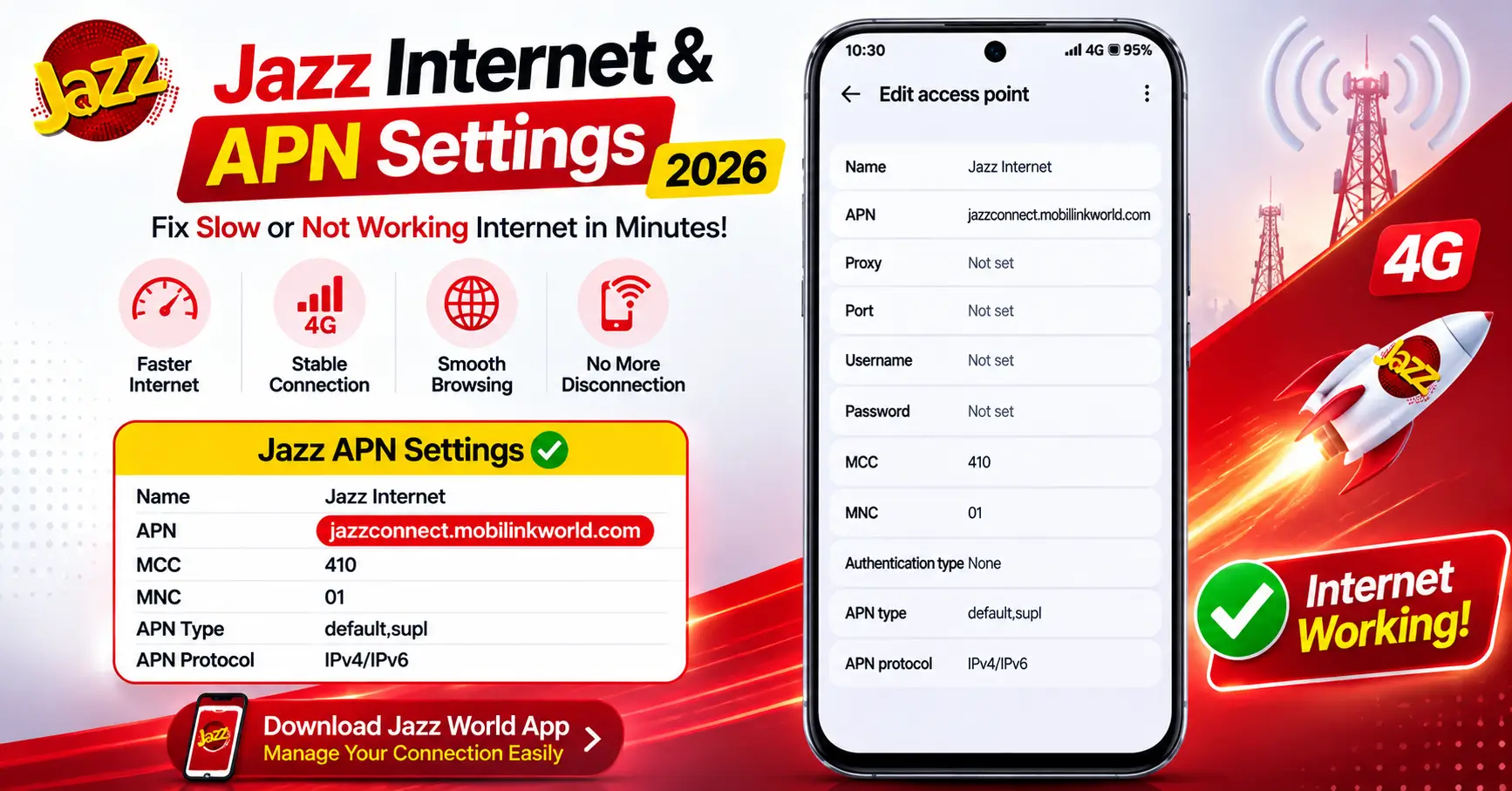
Enter the following values:
| Setting | Value |
|---|---|
| Name | Jazz Internet |
| APN | jazzconnect.mobilinkworld.com |
| Proxy | Not Set |
| Port | Not Set |
| Username | Not Set |
| Password | Not Set |
| Server | Not Set |
| MMSC | Not Set |
| MMS Proxy | Not Set |
| MMS Port | Not Set |
| MCC | 410 |
| MNC | 01 |
| Authentication Type | None |
| APN Type | default,supl |
| APN Protocol | IPv4/IPv6 |
After entering the information:
- Save the APN.
- Select the newly created APN.
- Restart your phone.
- Turn Mobile Data ON.
Your Jazz internet should start working within a few moments.
Jazz APN Settings for iPhone (Manual Setup)
If mobile data is not working on your iPhone, you can manually check the APN settings.
Go to:
Settings → Mobile Data → Mobile Data Network
Enter the following:
| Setting | Value |
|---|---|
| APN | jazzconnect.mobilinkworld.com |
| Username | Leave Blank |
| Password | Leave Blank |
After saving:
- Restart your iPhone.
- Enable Mobile Data again.
- Test your internet connection.
If your carrier automatically provides APN settings, manual editing may not be available.
Jazz World App Download & Login Guide
How to Reset APN to Default
If you’ve changed the settings incorrectly, resetting them often fixes the issue.
Android
- Open Settings
- Go to Mobile Network
- Tap Access Point Names
- Tap the three-dot menu
- Select Reset to Default
- Restart your phone
iPhone
- Open Settings
- Tap General
- Select Transfer or Reset iPhone
- Tap Reset
- Choose Reset Network Settings
Your phone will restore the default network settings.
Still Not Working? Other Common Fixes
If the correct Jazz Internet Setting still doesn’t solve the problem, try these solutions:
- Restart your phone.
- Turn Airplane Mode ON for 30 seconds, then OFF.
- Remove and reinsert your SIM card.
- Check if your data package is active.
- Make sure Mobile Data is enabled.
- Select the network mode as 4G/LTE Auto.
- Update your phone software.
- Test your SIM in another phone.
- Contact Jazz Customer Support if the issue continues.
Most internet problems are resolved after checking APN settings and restarting the device.
FAQs
What are the correct Jazz APN settings?
Use APN: jazzconnect.mobilinkworld.com with default network values.
Why is my Jazz internet not working even after setting APN?
Your data package may have expired, network settings may need resetting, or there could be a temporary network issue.
How do I reset APN settings to default on Android?
Open Access Point Names, tap the menu, and choose Reset to Default.
Do iPhone and Android need different APN values?
No, both use the same APN value, but the menu path is different.
Does APN setting affect internet speed?
Yes, incorrect APN settings can reduce speed or prevent internet access.